Key Takeaways
- Bing Webmaster Tools is a free growth asset. It gives you direct visibility into how Bing crawls, indexes, and ranks your site, without any paid tiers.
- Setup is simple, but structure matters. Add your site, verify ownership, submit your sitemap, and enable alerts before diving into optimization.
- Search Performance now includes extended historical data. With up to 16 months of reporting, you can analyze trends, seasonality, and long-term performance more accurately.
- AI Performance reporting is a strategic advantage. You can now see when your content is cited in AI-generated answers, helping you optimize for authority and AI visibility.
- IndexNow accelerates discovery. If you publish or update content frequently, notifying Bing directly can shorten the gap between changes and search visibility.
- Technical tools prevent revenue leaks. URL Inspection, Site Explorer, Crawl Control, and Site Scan help identify crawl issues, indexing gaps, and structural errors before they impact traffic.
- Bing SEO complements Google SEO. Using both platforms creates diversification, reduces dependency risk, and expands total search coverage.
- Monitoring turns insight into growth. Weekly check-ins and alert tracking ensure small issues do not become performance setbacks.
Most brands treat Bing as an afterthought because Google gets the attention. That mindset leaves money on the table.
Bing is not just “another search engine.” It sits inside the Microsoft ecosystem and now includes AI visibility reporting that most SEO teams have been asking for, for years. If you are serious about search diversification, faster indexing, and AI-era discoverability, Bing Webmaster Tools is no longer optional.
This guide is structured as a true how-to for first-time users, while including the newest portal updates and reports.
What is Bing Webmaster Tools?
Bing Webmaster Tools is a free Microsoft platform that helps you monitor, maintain, and improve your website’s visibility in Bing search. It shows how Bing crawls and indexes your site, highlights SEO and technical issues, and includes tools for keywords, backlinks, and site auditing.
Why use Bing Webmaster Tools?
Here is what you gain by setting it up:
1) Access to a unique audience
Bing can help you reach searchers you might miss if you only focus on Google. This is especially relevant for brands that sell to mature, desktop-heavy, or high-intent audiences.
2) SEO insights specific to Bing
Inside the portal you get:
- Keyword research
- SEO reports and recommendations
- Site scan auditing for technical issues
These insights are tailored to Bing’s systems and can also improve overall SEO fundamentals.
3) Enhanced reporting and visibility tracking
Bing Webmaster Tools includes Search Performance reporting, backlink analysis, and newer visibility reporting tied to AI-generated answers.
Step-by-step: How to get started
Step 1: Create your account
Sign in to Bing Webmaster Tools using a Microsoft, Google, or Facebook account.
Step 2: Add your website
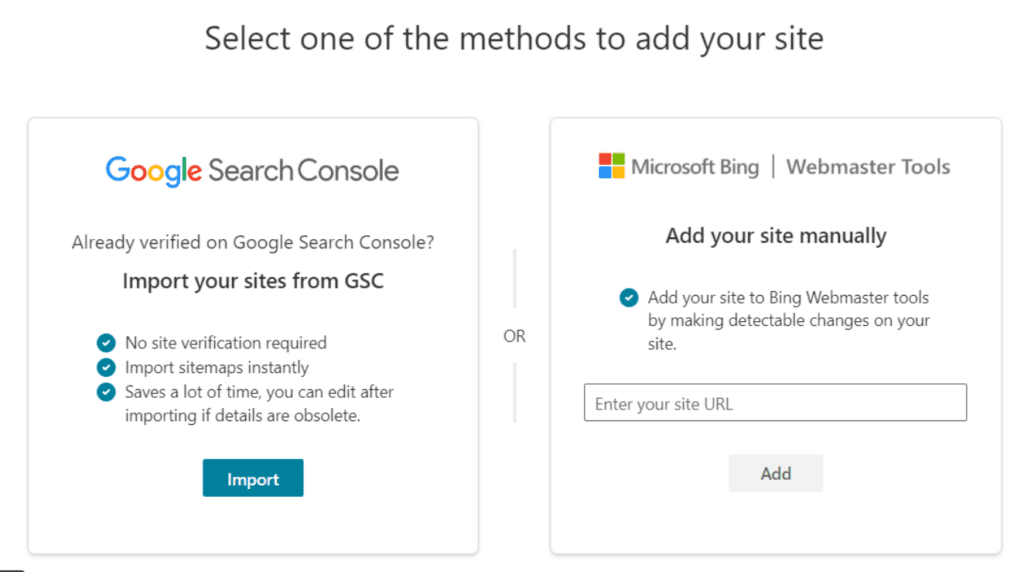
You can add your site in two ways:
- Manual add (enter your URL)
- Import from Google Search Console (recommended if you already use GSC)
Step 3: Verify ownership
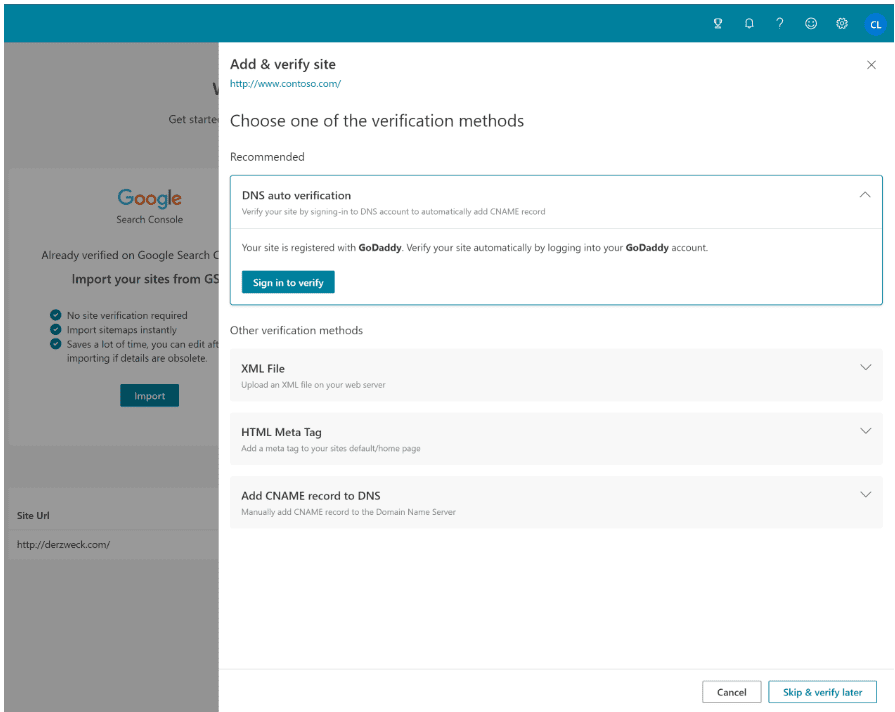
Verification unlocks full reporting and tools. Bing supports multiple methods, including:
- DNS (CNAME record)
- XML file upload to site root
- Meta tag in the site’s homepage head section
Step 4: Wait for reports to populate
Bing notes that reports may only generate after about 48 hours of collecting and processing data. Plan for that delay so you do not assume something is “broken” too early.
Step-by-step: Submit a sitemap or a URL
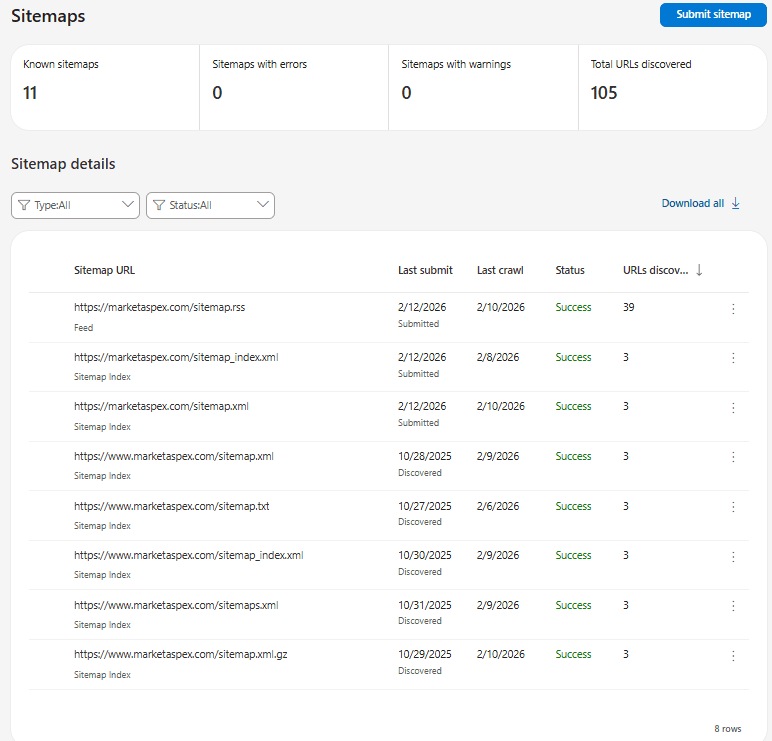
Submit your sitemap (recommended)
- Ensure your sitemap is accessible, typically like: https://yourdomain.com/sitemap.xml
- In Bing Webmaster Tools, open Sitemaps
- Submit the sitemap URL and confirm it appears in the list
4.You can submit sitemap in any of these formats:
- XML Sitemap
- RSS 2.0
- Atom 0.3 and 1.0
- Text (a plain text file containing one URL per line)
Submitting a Single URL
If you have updated one page or published a new URL and want Bing to recrawl it sooner, you can submit that page directly.
How to submit a URL in Bing Webmaster Tools:
- In the left menu, click URL Submission
- Paste the URL you want Bing to crawl
- Click Submit
Quick note: Bing limits how many URLs you can submit manually per day, so reserve this for priority pages.
When you submit your sitemap and key URLs, you help Bing discover and process your content more efficiently. That improves your chances of getting indexed faster, showing up in search results sooner, and capturing more qualified traffic over time.
Your first dashboard tour: What each area does
Home
A summary view of reports and tools available for your verified site.
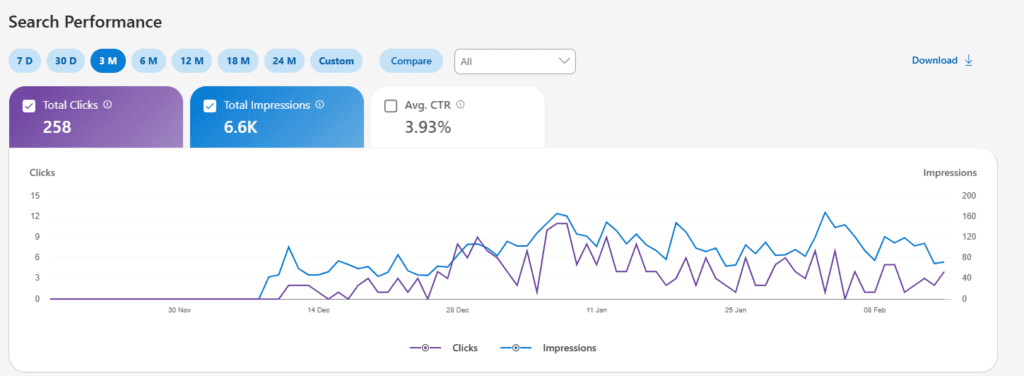
Search Performance
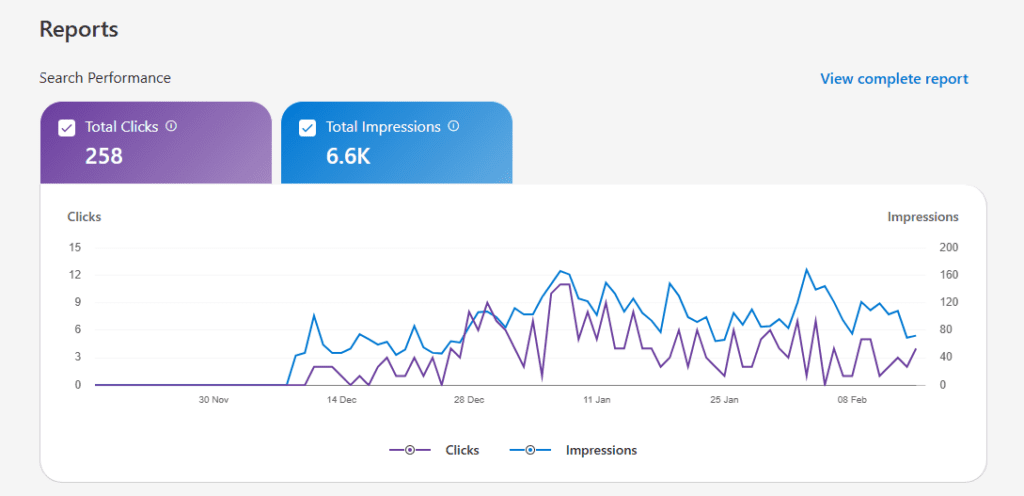
Tracks Bing search traffic with:
- Clicks
- Impressions
- CTR
- Page-level performance
- Keyword-level performance
Important update: Bing expanded Search Performance reporting to 24 months of historical data, which improves seasonality analysis and longer-term trend tracking.
URL Inspection
Lets you inspect Bing’s indexed version of a URL and diagnose indexing, crawl, SEO, and schema issues, then take action as needed.
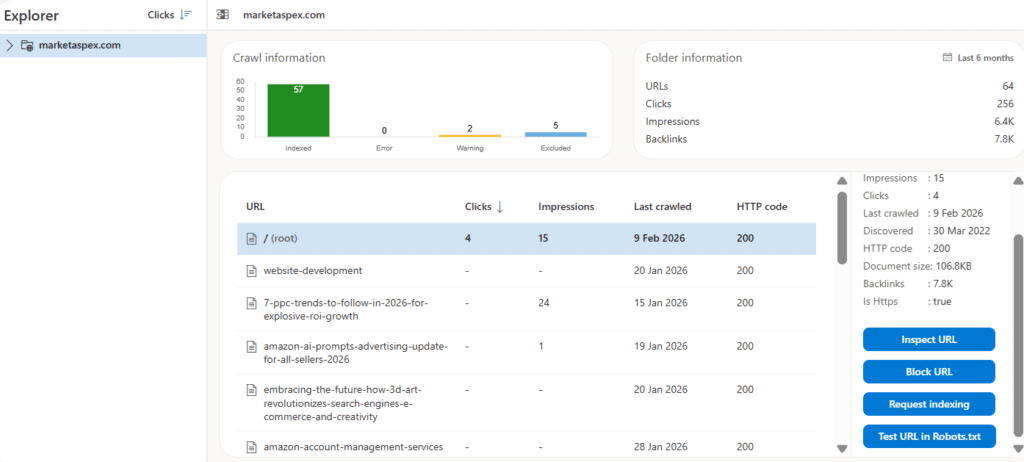
Site Explorer
A structured view of your site that helps you:
- Navigate discovered URLs
- Spot crawl issues
- Find redirects
- See URLs disallowed by robots.txt
Sitemaps
Shows all sitemaps Bing knows about, plus crawl and processing stats. You can submit or resubmit sitemaps from here.
The SEO tools inside Bing Webmaster Tools
Keyword Research
Use it to discover what Bing searchers are looking for and evaluate search volume for those terms.
SEO Reports
Automated recommendations based on Bing best practices, focused on common page-level issues that can impact ranking and crawlability.
Site Scan
An on-demand audit crawler that checks for technical SEO problems. Fixing these issues makes your site more crawlable and user friendly.
Bing configuration tools you should understand early
Crawl Control
Lets you manage how Bingbot crawls your site so you can reduce server strain during peak hours and increase crawling during off-peak periods.
Block URLs
Temporarily block pages or directories from showing in Bing results. Bing notes this is temporary and buys time while you make changes, but it does not remove the page from your site.
Robots.txt Tester
Helps you validate robots.txt syntax and test whether specific URLs are allowed or disallowed by your rules.
Verify Bingbot
Confirms whether an IP address is actually Bingbot, which is helpful for security, log analysis, and troubleshooting crawl behavior.
User Management
Add other users and assign permissions for multi-site or multi-team workflows.
IndexNow: the fastest win for most sites
IndexNow is a protocol that lets you notify Bing (and other participating engines) when you add, update, or delete content, so crawlers can prioritize those URLs for faster crawling and indexing.
If you publish frequently, run eCommerce inventory changes, or update service pages often, IndexNow can reduce the lag between changes and visibility.
Microsoft Clarity inside the Bing workflow
Microsoft Clarity is a free analytics tool that helps you understand how users actually interact with your site through:
- Heatmaps
- Session recordings
- Engagement insights
This is valuable because search visibility is only half the equation. Clarity helps you improve conversion and user experience after you earn the click.
New in 2026: AI Performance reporting
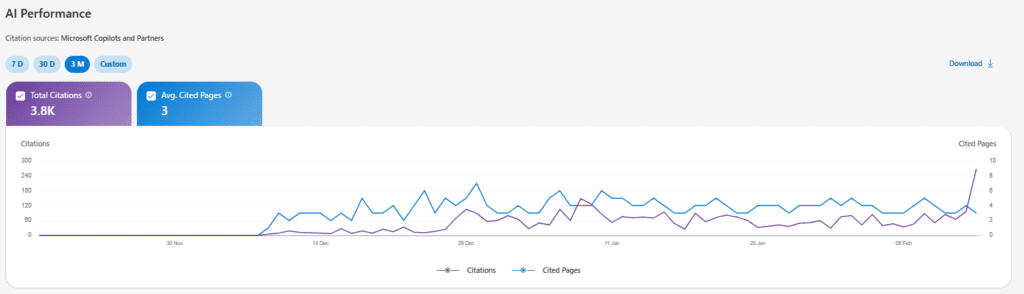
Bing Webmaster Tools introduced AI Performance (public preview), which reports how often your content is cited as a source in AI-generated answers across Microsoft Copilot, Bing AI experiences, and select partner integrations.
For first-time users, the practical use is simple:
- Identify which pages get cited
- Strengthen those pages with clearer structure and completeness
- Build more pages in that same “citation-friendly” format
Alerts and notifications: do not skip this
Bing provides a notifications system for issues like:
- Crawl issues
- Index issues
- Account-related alerts
- Product updates
Set email preferences so you receive digests and do not miss issues that quietly reduce visibility.
If you want to turn Bing visibility into a measurable growth channel, Market Aspex can help you build the systems behind it.
Frequently Asked Questions
Does Bing SEO matter?
Absolutely! While Google may dominate the search engine market share, Bing still accounts for a significant portion of web searches especially among certain demographics. Optimizing for Bing can help you tap into a unique audience with less competition, plus improve your site’s overall SEO across all search engines.
How is Bing Webmaster Tools different from Google Search Console?
While both tools aim to help you monitor and optimize your website’s performance in search results, there are some key differences:
- User demographics: Bing provides insights into a different user base, which can be valuable if your target audience aligns with Bing’s demographics.
- Keyword research: Bing Webmaster Tools offers robust keyword research features with unique data not available in Google Search Console.
- Integration with Microsoft Clarity: Bing integrates seamlessly with Microsoft Clarity for in-depth user behavior analytics.
- Different algorithms: Bing and Google have different ranking algorithms, so optimizing for both ensures broader visibility.
Using both tools provides a more comprehensive understanding of your site’s performance across the web.
Is Bing Webmaster Tools free to use?
Yes, Bing Webmaster Tools is completely free! There are no premium tiers or hidden costs, giving you access to all features. This makes it a cost-effective addition to your SEO toolkit, providing valuable insights without any financial investment.
How often should I check Bing Webmaster Tools?
Regular monitoring is key to maintaining and improving your site’s performance. Consistent engagement with Bing Webmaster Tools helps you stay ahead of potential problems and capitalize on new opportunities.
Consider checking Bing Webmaster Tools weekly, monthly, or after you make major updates but keep in mind that the right monitoring cadence is different for every site owner and will depend on your unique business needs.