
Key Takeaways
- Amazon listing hijacking happens when unauthorized sellers attach counterfeit or low-quality products to your ASIN, stealing the Buy Box and damaging your brand.
- It’s a major 2026 threat — Amazon reported 15M+ counterfeit items seized in 2024, showing hijackers remain aggressive.
- Hijacking hurts revenue, PPC efficiency, organic ranking, and customer trust, often before brands even notice.
- Early detection is critical : watch for sudden Buy Box loss, unfamiliar sellers, price drops, and spikes in negative reviews.
- Long-term protection requires trademarks and Brand Registry, Transparency, Project Zero, distinctive branding, and consistent monitoring.
Why Amazon Listing Hijacking Is a Real 2026 Risk
You log into your seller dashboard — and everything looks normal. PPC spend is steady. Then you check sales: they’ve dropped. Overnight. Meanwhile your TACoS has spiked. Reviews are coming in, but many are 1-star or 2-star, complaining of “cheap materials,” “not as described,” or “broken on arrival.”
Welcome to listing hijacking where you lose the Buy Box, your genuine customers get a counterfeit or low-quality version, and your brand reputation suffers often before you even realize what happened.
In 2024, Amazon reported that it had identified, seized, and appropriately disposed of more than 15 million counterfeit products worldwide which is a massive figure that underlines how widespread the threat remains.
Need clarity on your marketing data?
See how Market Aspex helps brands scale smarter.
Learn More → Explore all services →This is not a relic of the past but it’s a real, ongoing risk for every serious seller.
If you care about predictable revenue, brand integrity, and long-term growth, ignoring hijacking is not an option.
What Is Amazon Listing Hijacking?
Listing hijacking occurs when an unauthorized seller attaches their own counterfeit, generic, or low quality product to your ASIN. This allows them to ride your listing’s brand equity and reviews, often at a lower price, which steals the Buy Box.
Customers buy thinking it is your product. When it arrives and disappoints, they leave negative reviews on your listing, not the hijacker’s.
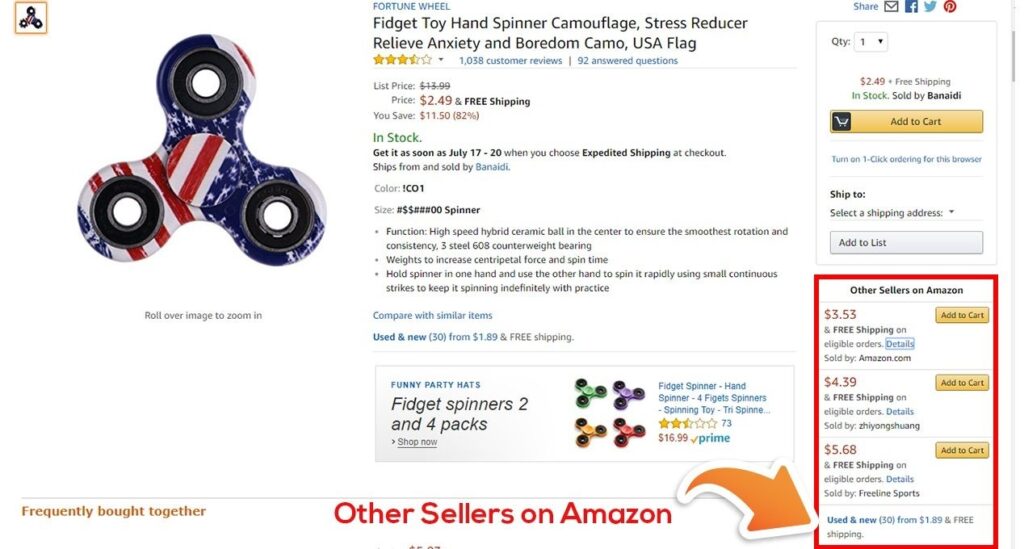
Image: Amazon product listing for Fidget Toy
How are Amazon hijackers different from Amazon resellers?
It is important to differentiate between Hijackers and Legitimate resellers.
- Hijackers: unauthorized sellers offering counterfeit or materially different items.
- Legitimate resellers: sellers offering real units sourced legitimately.
- Arbitrage sellers: sellers buying discounted genuine units and reselling them.
Your response depends on which group a seller belongs to.
How do I know if an Amazon seller hijacked my listing?
You can often spot a potential Amazon hijacker just by looking at your product page. Warning signs include:
- A seller you don’t recognize suddenly appears on your listing. If it’s not your brand or an approved reseller, treat it as suspicious.
- The Buy Box switches to a seller you never authorized. This is one of the most obvious signs your listing may be compromised.
- A new offer appears at a price that seems too low. Hijackers often undercut your price aggressively to steal sales.
- New reviews look strange or negative. Customers may mention receiving a fake, damaged, or completely different product. These reviews usually show up suddenly and break your normal review pattern.
Data and Operations Signals
Even if things look normal on the product page, your backend data may reveal problems. Pay attention if:
- Your conversion rate drops, but your traffic stays the same. This often means shoppers are buying from another seller or abandoning the listing entirely.
- You see a spike in returns, complaints, or “not as described” feedback. This is common when customers receive counterfeit items.
- Your branded keyword rankings start falling. Amazon’s algorithm reacts to poor performance signals quickly.
- Your Buy Box ownership goes up and down without explanation. Fluctuations usually mean an unauthorized seller is competing for the box.
Quick Audit Checklist
If you suspect something is wrong, run this fast audit:
- Who currently owns the Buy Box? It should be you or an approved reseller.
- How many sellers are attached to your ASIN? One unexpected seller is enough to cause issues.
- What do your most recent reviews say? Look for mentions of fakes, damaged items, wrong products, or quality changes.
- Have returns or customer complaints increased? This is often one of the earliest warning signs.
How to remove hijackers from your Amazon listing
Speed is your best defense when someone hijacks your Amazon listing. The faster you act, the less damage you’ll see in lost sales, negative reviews, and confused customers. If you discover an unauthorized seller on your listing, follow these simple steps to get control back.
1. Send the Hijacker a Cease and Desist Letter
The quickest move you can make is sending a cease and desist message directly to the seller. This often scares off low level hijackers and stops the problem before it gets worse. Here is how to send one:
- Go to your product listing and click the seller’s username.
- On their profile page, select “Ask a question” in the top right corner.
- Choose “An item for sale” as the topic.
- Select “Question about a product.”
- Paste your cease and desist letter into the message box.
- Submit the message.
If you don’t already have a cease and desist template, you can find reliable Amazon specific versions online, or ask your legal team to draft one. This keeps communication professional and clear.
2. Report the Hijacker to Amazon
After sending your message, the next step is to notify Amazon directly.
To file a proper report, your brand needs a registered trademark in the marketplace where the violation occurred.
Example:
- A US trademark is needed for issues on Amazon.com
- A UK trademark is needed for Amazon.co.uk
Once confirmed, submit a trademark infringement report using Amazon’s Report Infringement form.This alerts Amazon that someone may be misusing your brand name or violating your intellectual property rights.
3. Purchase the Hijacker’s Product and Report It
For stronger proof, buy the counterfeit product yourself. Amazon takes reports with test buy evidence much more seriously. For best results, do this before sending any warnings or filing complaints. If you warn them too early, they may cancel your order and avoid detection.
Follow these steps:
- Purchase the product directly from the unauthorized seller.
- When it arrives, take clear photos of the counterfeit item compared to your real product.
- Make a list of all differences: packaging, color, weight, materials, instructions, branding, etc.
Depending on what you find, report the seller using one of two Amazon forms:
- Report Infringement form if the counterfeit uses your brand name or logo
- Violation form if the hijacker uses a different brand name but attaches it to your listing
Include the following information to strengthen your case:
- Hijacker’s seller name
- Link to the hijacker’s seller page
- Your product’s ASIN
- Your product’s listing title
- The Amazon marketplace where it happened
- Order ID from your test buy
- Photos of the fake and real product side by side
Be sure to clearly explain:
- What the hijacker is doing (ex: selling a counterfeit version of your product)
- How their product differs from yours
- Why this behavior harms shoppers and creates a poor customer experience
Once completed, submit the form to Amazon.
4. Join Amazon’s Anti Counterfeit Programs
After you remove the hijacker, it’s important to prevent it from happening again. These Amazon programs help protect your listings long term:
Amazon Transparency Program
You purchase special 2D codes and apply them to your products. Amazon scans these codes before shipping any unit, which blocks counterfeits from being fulfilled.
Amazon Project Zero
Available to Brand Registry members, this program gives brands the ability to detect and remove counterfeit listings themselves. If you’re already enrolled, use these tools to take action quickly whenever hijacking appears.
Even if you cannot use these programs immediately, enrolling in them is a smart long term investment. They dramatically reduce your risk of future hijacking, which saves your business significant time, money, and reputation damage.
7 Ways to Prevent Amazon Product Listing Hijacking
Even with these tools, brands still need strong protections in place.
Now that you know how to remove hijackers from your Amazon listing, let’s talk about how to stop them from showing up in the first place. With a few smart actions, you can protect your brand, your sales, and your customers from counterfeiters.
Here are seven effective ways to prevent Amazon listing hijacking.
1. Enroll in Amazon Brand Registry
Amazon Brand Registry is one of the strongest defenses against hijackers. It gives you access to tools that help Amazon verify your brand, protect your intellectual property, and control your listings.
You can enroll if your brand has a registered text or image based trademark in any of the eligible regions, including:
United States, Canada, Mexico, Brazil, Australia, India, Japan, United Kingdom, Germany, France, Italy, Spain, Netherlands, Sweden, Turkey, Saudi Arabia, United Arab Emirates, Singapore, and the European Union.
Your application must include:
- Your brand name
- Your trademark registration number
- The product categories your brand sells in
If you want to get Brand Registry access faster, you can apply through Amazon’s IP Accelerator, which speeds up the approval process.
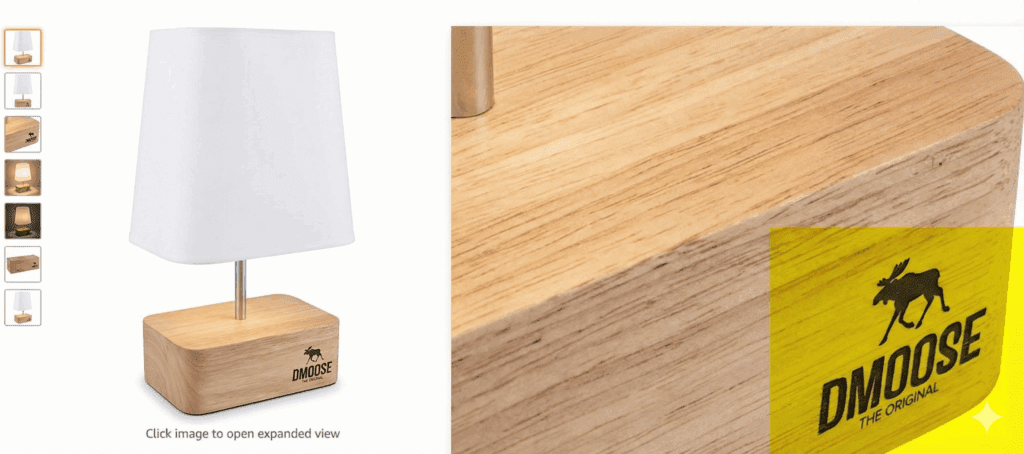
2. Add Clear Branding to Your Product and Packaging
One of the easiest ways to deter hijackers is to make your product difficult to copy.
Add your:
- Logo
- Brand name
- Unique design elements
- Packaging details
Shoppers should be able to easily recognize your product, and counterfeiters should struggle to replicate it. Clear branding also makes it easier for Amazon to compare fake items to your real products during investigations.
3. Trademark Your Products
If you haven’t secured a trademark yet, make it a priority.
A trademark is one of the most powerful tools you have against hijackers because it proves legal ownership of your brand.
Trademark applications in the U.S. typically take 9 to 18 months, so start early.
Once your trademark is approved, enroll in Brand Registry to unlock extra protections.
4. Use Product Bundling to Make Copying Harder
Bundling your products is a simple way to reduce hijacking risk. When you sell a bundle, a hijacker must copy not just one product, but multiple items and the bundle packaging.
The key is to create bundles that make sense for shoppers.
For example:
- Cable management box + cord organizers
- Yoga mat + carrying strap
- Skincare serum + moisturizer
When your bundle is logical and unique, it becomes much harder for counterfeiters to mimic accurately.
5. Lock Your ASINs Using Brand Catalog Manager
Once you join Brand Registry, you gain access to Brand Catalog Manager, a tool that helps protect your listings by locking down key details.
You can lock fields such as:
- Product title
- Images
- Descriptions
- Key attributes
This prevents unauthorized sellers from changing your listing content or inserting misleading information.
6. Set Up Fraud Monitoring and Alerts
Early detection is half the battle.Third party tools like Helium 10 and SellerSonar offer automated alerts for:
- New sellers attaching to your ASIN
- Sudden price drops
- Buy Box changes
- Listing edits
- Suspicious activity
Most tools require a paid subscription, but the protection and visibility they offer can save brands thousands in lost revenue.
7. Sell Your Products on Your Website Too
Selling on your own website adds an extra layer of authenticity and provides Amazon with a trusted reference point during disputes.
Even if you do not want to run a full ecommerce operation, you can:
- Publish product pages
- Display your product catalog
- Highlight your branding and product details
But if you do enable ecommerce, you gain:
- A new revenue stream
- Direct customer relationships
- More control over your brand experience
Either way, your website strengthens your claim as the legitimate brand owner, making it easier to remove hijackers quickly.
FAQs
What is Amazon listing hijacking?
Amazon listing hijacking happens when an unauthorized seller attaches a counterfeit or low quality version of your product to your listing. These knock off items often take over the Buy Box or show up in the “Other Sellers on Amazon” section. This leads to lost sales, confused customers, and negative reviews that hurt your brand.
How are Amazon hijackers different from Amazon resellers?
Hijackers sell counterfeit, altered, or unauthorized copies of your product.
Resellers, on the other hand, sell genuine units they purchased legally (for example through wholesale or liquidation).
If the product is real, it is considered reselling.
If the product is fake or different from what you offer, it is hijacking.
How do I know if an Amazon seller hijacked my listing?
Common signs include:
- A seller you do not recognize appears on your listing
- The Buy Box switches to another seller
- A new offer appears at an unusually low price
- You start receiving strange or negative reviews referencing fake or damaged items
- Your conversion rate drops while traffic stays the same
If you see more than one of these signs at the same time, you may be dealing with a hijacker.
How do I remove hijackers from my Amazon listing?
To remove a hijacker, follow these steps:
- Send a cease and desist letter through the seller’s profile
- Report the violation to Amazon using the appropriate form
- Purchase the counterfeit product and submit photo evidence
- File either a Report Infringement or Violation form with documentation
- Use Brand Registry tools, such as Transparency or Project Zero, to remove and prevent future hijacking
Taking action quickly helps minimize sales loss and negative customer feedback.
What are the best ways to prevent Amazon listing hijacking?
You can reduce your risk by:
- Enrolling in Amazon Brand Registry
- Adding clear branding to your product and packaging
- Securing trademarks for your brand
- Creating product bundles that are harder to duplicate
- Locking your ASINs through Brand Catalog Manager
- Setting up monitoring and alerts for listing changes
- Selling products on your own website to provide proof of authenticity
These steps make it harder for hijackers to target your listings and easier for Amazon to remove them quickly.
Amazon Hijack Prevention Checklist Free Download
A printable one-page PDF designed for brands, operators, and Amazon teams who want to keep their listings safe year-round.