If your Google Business Profile is suspended, do not rush into an appeal. Open Google’s official appeals tool, review the moderation reason and linked policy, fix any genuine eligibility or profile issues, prepare supporting evidence, and then submit one clear appeal.
- Google’s appeals tool can show the restricted profile, the moderation reason, and the policy involved.
- Business names should match real-world branding rather than contain added SEO keywords.
- Service-area businesses that do not serve customers at their address should hide that address and use service areas.
- Google allows up to 20 service areas and says the overall area generally should not extend beyond about two hours of driving time from the business base.
- Evidence can include business registration, licenses, tax certificates, and qualifying business utility bills.
- Do not create another Business Profile for the same business while an appeal is under review.
- If reinstatement is denied, Google may offer an additional review.
A suspended Google Business Profile can remove one of the most important local discovery channels from Google Search and Maps. For local companies that depend on calls, direction requests, and nearby searches, that loss can quickly affect lead flow.
The first move should not be random edits or an immediate appeal. The better sequence is to understand the moderation reason, correct any real policy issue, gather evidence, and then submit the strongest possible case.
Why Google Business Profile Suspensions Matter for Orlando Businesses
Orlando is highly competitive across home services, legal, medical, hospitality, automotive, and other local categories. A Business Profile can sit close to the point where a search becomes a call, website visit, booking, or direction request.
That makes suspension recovery a visibility issue, but it is first a compliance issue. Google’s published guidance emphasizes accurate representation, eligible business models, correct addresses or service areas, and compliant ownership and management.
Google Business Profile Suspension at a Glance
| Area | What Google Says | What to Do |
| Appeal starting point | Use the Business Profile appeals tool. | Review the listed reason and linked policy before making changes. |
| Business name | Use the real-world name used consistently in branding. | Remove added city, service, or promotional keywords that are not part of the actual name. |
| Address | Use a precise, legitimate business location. | Do not use a virtual office or an address that does not meet Google’s rules. |
| Service-area business | Hide the address if customers are not served there. | Set accurate service areas instead. |
| Evidence | Registration, license, tax and utility documents may help. | Prepare documents before starting the evidence step. |
| Duplicate profile | One profile per eligible location in most cases. | Do not create a replacement profile while an appeal is pending. |
First: Check What Google Says Was Restricted
Google’s current appeals tool can show the restricted profile, the reason for the moderation action, and a link to the policy involved. That makes the official appeal screen the best place to start instead of guessing from third-party checklists. Google: Fix suspended or disabled profiles
Why Do Google Business Profiles Get Suspended?
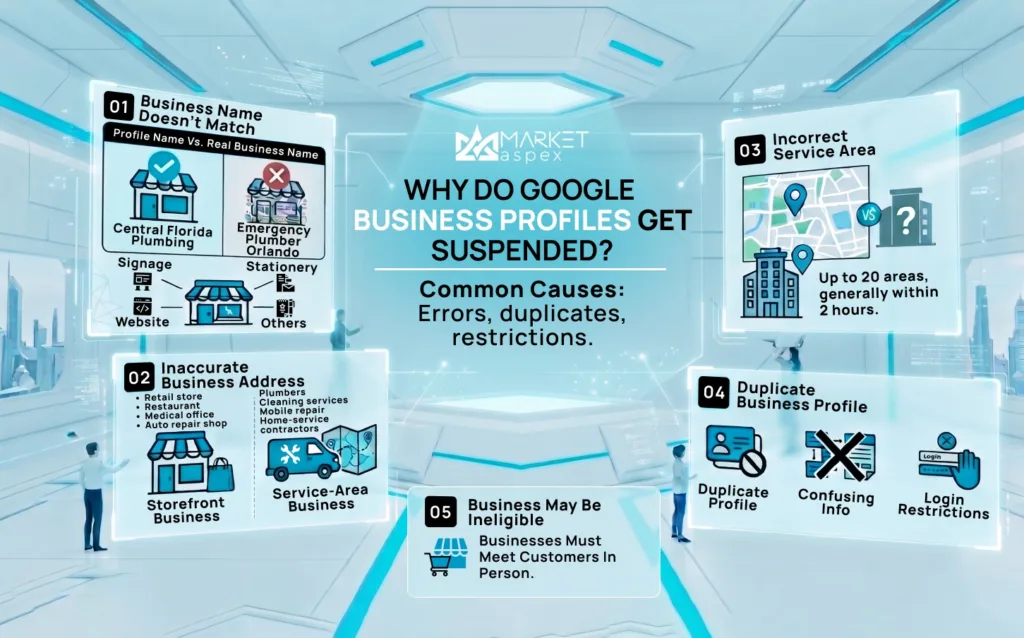
There is no single suspension trigger. Common problems involve inaccurate business representation, profile eligibility, business names, addresses, service-area setup, duplicate profiles, or account-level restrictions.
1) The Business Name Does Not Match the Real Business
Google says a Business Profile name should reflect the business’s real-world name as it is used consistently on signage, the website, stationery, and other branding. Adding unnecessary information to the name is not permitted and can result in suspension.
Example: “Central Florida Plumbing” is appropriate if that is the real business name. “Central Florida Plumbing | Best Emergency Plumber Orlando FL” can be a problem if the added wording is not part of the actual name.
Source: Google Guidelines for representing your business
2) The Address Does Not Accurately Represent the Business
Google requires a precise and accurate address when an address is shown. Virtual offices are not eligible unless the location meets Google’s specific requirements, and businesses displaying an address should operate from a real-world location that qualifies under the guidelines.
If customers do not visit your address, the bigger question is whether the address should be public at all.
Storefront Business
• Retail store
• Restaurant
• Dental or medical office
• Auto repair shop
A storefront generally serves customers at its physical location and should use an accurate address that meets Google’s signage and staffing expectations.
Service-Area Business
• Plumbers
• Cleaning companies
• Mobile repair businesses
• Many home-service contractors
Google says that if a business travels to customers and does not serve customers at its own address, it should remove the public address and use a service area instead.
3) The Service Area Is Configured Incorrectly
Google currently allows up to 20 service areas based on cities, postal codes, or other supported areas. It also says the boundaries of the overall service area generally should not be more than about two hours of driving time from where the business is based.
Do not add cities simply because you want to rank there. The service area should reflect where the company realistically serves customers.
4) There Is More Than One Profile for the Same Business
Google’s guidelines generally call for one Business Profile for each eligible business location, with limited exceptions. Duplicate profiles can appear after moves, agency handoffs, ownership changes, or when a team creates a new listing without finding the old one first.
Most importantly, Google explicitly says not to create another Business Profile for the same business while an appeal is under review.
5) The Business May Not Be Eligible for a Profile
Google says eligible businesses generally make in-person contact with customers during their stated hours, with specific exceptions. Examples of ineligible businesses include online-only businesses, lead generation companies, and certain rental or for-sale properties.
Treat a suspension as a compliance problem before treating it as a ranking problem. Fix the underlying representation or eligibility issue first. Local SEO optimization comes after the profile is accurate and compliant.
What Should You Check Before Appealing?
Run a focused profile audit before submitting anything.
Business Name
• Match the real-world business name.
• Remove added service keywords, city names, promotional phrases, URLs, or phone numbers that are not genuinely part of the business name.
Business Address
• Confirm the location is legitimate and correctly entered.
• Make sure suite or unit information is accurate.
• Confirm customers actually visit the location if the address is publicly shown.
• If customers are not served there, evaluate whether the address should be hidden.
Service Area
• Use service areas that reflect where the business truly operates.
• Do not use a radius; Google now uses cities, postal codes, or other supported areas.
• Keep the total setup within Google’s published limits and practical operating area.
Categories
Choose the fewest categories needed to describe the core business. Google specifically warns against using categories only as keywords or to describe features rather than the business itself.
Duplicate Profiles
Search Google Maps and Search for your company name, old business names, previous addresses, and phone number. If another profile represents the same business, investigate that listing instead of creating another one.
What Documents Should You Prepare?
Google says evidence that can strengthen an appeal may include:
• Official business registration
• Business license
• Tax certificates
• Business utility bills such as electricity, phone, water, or internet
Google recommends checking that the business name and address on the evidence match the profile being appealed. Also note an important current requirement: once you open the evidence form, Google says the evidence must be submitted within 60 minutes for it to be attached to the appeal.
How to Appeal a Suspended Google Business Profile
1) Open the Appeals Tool
Sign in with the Google account associated with the Business Profile and open Google’s official Business Profile appeals tool.
2) Select the Correct Profile
Make sure you are appealing the actual profile affected by the moderation action.
3) Review the Moderation Information
Check the reason Google provides and open the linked policy before making changes.
4) Fix Genuine Policy Problems
Correct inaccurate or noncompliant information where appropriate before the appeal.
5) Submit the Appeal
Keep the explanation concise and factual. State what business the profile represents, why it is eligible, what was corrected, and what evidence supports the profile.
6) Add Evidence
If Google offers the evidence step, attach the most relevant documents within the stated submission window.
What Should You Not Do After a Suspension?
• Do not create a replacement profile for the same business while the appeal is pending.
• Do not stuff extra keywords into the business name.
• Do not use an inaccurate address to appear in another city.
• Do not add service areas you do not realistically serve.
• Do not make a series of random profile changes without understanding the issue.
• Do not submit unsupported claims about the business.
What If Google Denies the Appeal?
Google says that when a reinstatement request is denied, an additional review may be available. This gives the business another opportunity to provide evidence that was not included with the original appeal.
Before requesting another review, audit the case again:
1. Did we misunderstand the policy violation?
2. Is the business actually eligible for a Business Profile?
3. Is the business name accurate?
4. Is the address appropriate for the business model?
5. Should the address be hidden?
6. Is there another profile for the same business?
7. Does the evidence clearly support the profile information?
8. Is the issue tied to the Business Profile or to the Google account managing it?
Does a Suspension Hurt Local SEO?
Yes, it can significantly reduce visibility in Maps and Business Profile-driven local search because the public may no longer be able to access the profile while it is removed. That does not automatically remove the company website from Google’s organic results; the website and Business Profile are separate search surfaces.
That is why local businesses should not build their entire acquisition strategy around one profile. A stronger local search system combines the Business Profile with local landing pages, helpful service content, reviews, technical SEO, structured business information, authority signals, and conversion tracking.
For a broader view of how local visibility is changing, read Market Aspex’s Local SEO for AI Search: 10 Strategies to Increase Visibility in AI Mode.
How to Reduce the Risk of Another Suspension
Keep Core Business Information Accurate
• Business name
• Phone number
• Website
• Address
• Service areas
• Hours
• Business categories
Be Careful With Major Changes
Google notes that a verified business that moves to a new address may need to verify again. Treat major profile changes as operational changes, not casual SEO edits.
Keep Ownership Controlled
The business owner should keep appropriate ownership of the profile. Agencies and marketing partners should normally be added as authorized managers rather than becoming the only party controlling the listing.
Keep Your Website Consistent With the Business
Your website should clearly state who the company is, what it does, how customers can contact it, and where it operates. Consistent business information makes the entity easier for customers, search engines, and reviewers to understand.
Google Business Profile Recovery Is Only Part of Local SEO
Getting the listing reinstated solves the immediate visibility problem. The next step is making sure local acquisition does not depend on one listing alone.
Market Aspex approaches local SEO as a system connecting the Business Profile with website content, technical SEO, internal linking, authority, and conversion measurement. Explore our White Hat SEO Services for a broader view of that framework.
LET’S BUILD WHAT’S NEXT
If a Google Business Profile suspension exposed gaps in your local visibility, build a stronger system around compliant profile management, local content, technical SEO, authority, and measurement.
Speak with Market Aspex.
Aisha | Market Aspex Team
Aisha is an SEO Manager and Content Strategist at Market Aspex with over five years of experience across multiple industries, including real estate, ecommerce, and professional services. She develops data-informed content and SEO strategies that improve search visibility, attract high-intent traffic, and support measurable business growth.