
What does “Amazon package delayed in transit” mean?
It means your shipment is taking longer than Amazon or the carrier originally expected.
The package may still be:
- Moving between carrier facilities
- Waiting for another tracking scan
- Delayed by weather or traffic
- Held up by high shipping volume
- Delayed during customs clearance
- Affected by a carrier or transportation problem
Amazon recommends waiting up to 48 hours past the estimated delivery date before escalating most late deliveries.
Need clarity on your marketing data?
See how Market Aspex helps brands scale smarter.
Learn More → Explore all services →If there is still no update after that period, what you do next depends on who shipped the order.
If your Amazon package says “delayed in transit,” it usually means the shipment is still moving through the delivery network but something has prevented it from arriving by the original estimated delivery date.
It does not automatically mean your package is lost.
Amazon says delivery delays can happen because of weather, traffic, high holiday shipping volume, customs delays, or operational problems. Amazon currently recommends checking your tracking information and allowing 48 hours after the estimated delivery date, since many delayed packages arrive during that window. Amazon DigPRJ Survey
For Amazon sellers, a delayed shipment can mean something different. The impact depends on whether the order was fulfilled by Amazon or shipped directly by the seller.
What Does “Package Delayed in Transit” Mean on Amazon?
“Delayed in transit” usually means your package has entered the shipping network but will not arrive when originally expected.
Think of it as a delay, not necessarily a loss.
The carrier may have scanned the package at one facility and then experienced a delay before the next scan. In other cases, Amazon may already know that the package will miss the delivery estimate and update the order status before the carrier provides another scan.
Amazon lists several common causes of late deliveries:
- Bad weather
- Heavy traffic
- High delivery demand during holidays
- Customs delays for international orders
- Operational issues such as transportation problems
If Amazon is handling delivery, it can update the order tracker as new information becomes available. If another carrier is handling the shipment, Amazon recommends checking that carrier directly because it may have the most current shipping information.
Why Is My Amazon Package Delayed in Transit?
There is no single reason every Amazon package gets delayed.Here are some of the most common causes.
1. Carrier Delays
Amazon uses its own logistics network as well as outside carriers.
A delay can happen when a package misses a transfer, arrives late at a sorting center, or encounters a problem somewhere between fulfillment and final delivery.
2. Weather
Snowstorms, flooding, hurricanes, severe rain, extreme heat, and other weather conditions can disrupt transportation routes.
A package may stop moving temporarily even when your local weather looks normal because the delay occurred earlier in the shipping route.
3. Heavy Shipping Volume
Prime Day, Black Friday, Cyber Monday, Christmas, and other busy shopping periods create much higher package volume.
Even well-planned carrier networks can experience temporary bottlenecks.
4. Tracking Has Not Updated
A lack of tracking updates does not always mean the package stopped moving.
Sometimes a scan is missed or delayed, and the next tracking event may not appear until the package reaches another facility or goes out for delivery.
5. Customs Delays
International Amazon orders may spend additional time in customs.
Documentation, inspections, duties, or import requirements can delay the shipment even after it reaches the destination country.
6. Operational Problems
Amazon specifically lists operational problems, including vehicle issues, as a possible reason for delayed deliveries.
How Long Does “Delayed in Transit” Take on Amazon?
There is no fixed delay period for every Amazon order.A delayed package might arrive the next day, while another shipment may take several additional days.
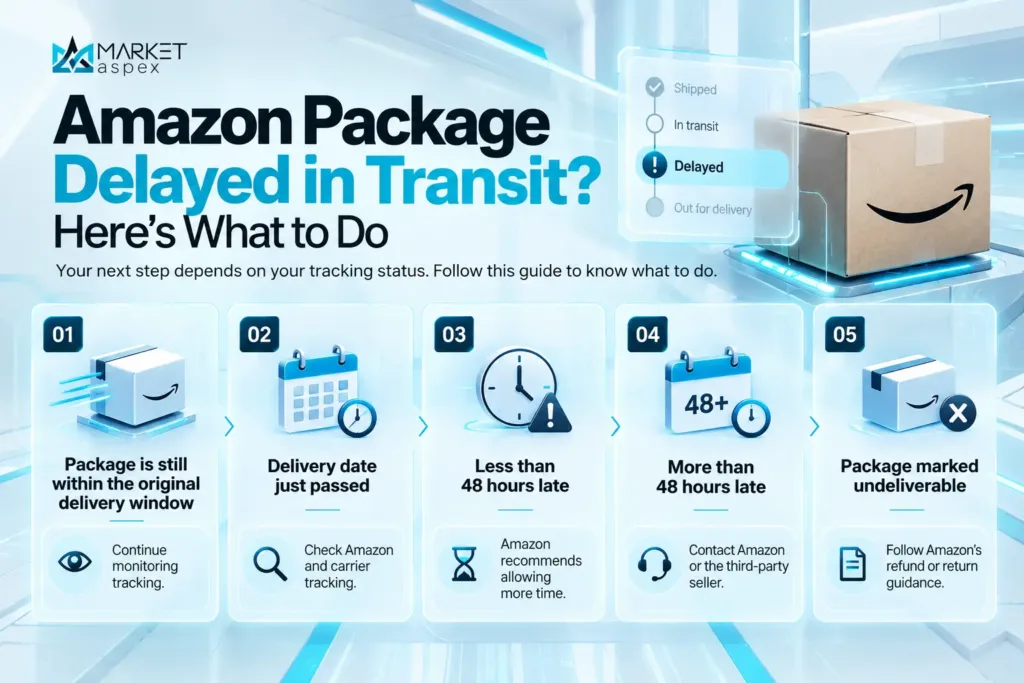
Amazon’s current guidance is to allow 48 hours after the estimated delivery date for unexpected delays. According to Amazon, most late deliveries arrive within that period.
That gives us a useful rule of thumb:
What Should I Do If My Amazon Package Is Delayed in Transit?
If an Amazon order is late, work through these steps before assuming the package is lost.
1. Check Your Amazon Order
Go to Your Orders and open the affected order.
Review:
- Current tracking status
- Estimated delivery date
- Latest carrier scan
- Any revised delivery estimate
- Messages from Amazon
Amazon updates order tracking when new shipment information becomes available.
2. Check Your Email and Amazon Messages
Amazon may send an email when it knows a delivery has been delayed.
You can also check your Amazon Message Center for order-related communication.
3. Check the Carrier’s Tracking
If UPS, USPS, FedEx, or another carrier is handling the shipment, check the tracking number directly with that carrier.
Amazon states that the carrier may have the latest shipping information.
4. Allow Up to 48 Hours
Amazon recommends allowing 48 hours past the estimated delivery date for unexpected delivery delays.
Many late packages still arrive during this period.
5. Contact Amazon or the Seller
If 48 hours have passed and the package still has not arrived:
If Amazon shipped the order: Contact Amazon Customer Service.
If a third-party seller shipped the order: Contact the seller through Amazon.
For Amazon-shipped orders, Amazon currently advises customers to contact Customer Service within 30 days of the estimated delivery date if the shipment remains unresolved.
Does “Delayed in Transit” Mean My Amazon Package Is Lost?
No.
Delayed in transit and lost are not the same thing.
A package may still be progressing through the shipping network even if there has not been a recent tracking update.
A delay becomes more concerning when:
- The estimated delivery date passed several days ago
- Tracking has stopped updating for an extended period
- The carrier reports a shipping problem
- Amazon tells you to contact Customer Service
- The shipment is eventually marked undeliverable
That is why it usually makes sense to follow Amazon’s 48-hour guidance before assuming a delayed package is gone.
Why Does Amazon Say “Delayed in Transit” With No Update?
One of the most frustrating situations is seeing the same tracking message for several days.
This can happen because the physical movement of a package and its tracking updates do not always happen at the same time.
For example, the package could:
- Miss a carrier scan
- Be waiting at a sorting facility
- Be moving between facilities
- Be delayed before the next transportation leg
- Be waiting for local delivery
- Be affected by an operational or weather issue
If an outside carrier is handling the package, check the carrier’s own tracking system before assuming that Amazon’s page has the newest information.
Can I Get a Refund If My Amazon Package Is Delayed?
A delay does not automatically mean the entire order will be refunded.However, Amazon says that when an order had a guaranteed delivery date and Amazon missed that date, the customer may be eligible for a refund of the delivery fee.
The outcome can also depend on:
- Who sold the item
- Who shipped the item
- How late the package is
- Whether the package eventually arrives
- Whether Amazon considers the shipment lost or undeliverable
If your package remains unresolved after Amazon’s recommended waiting period, contact Customer Service or the third-party seller through your order page.
Is “Delayed in Transit” the Same as “Undeliverable”?
No.
They describe different situations.
Delayed in transit means the shipment is late but may still be delivered.
Undeliverable means the carrier cannot complete delivery and the shipment generally cannot continue to the customer.
A delayed package can return to normal tracking and arrive without any action from you.
Can I Cancel an Amazon Package That Is Delayed in Transit?
Cancellation becomes more difficult once an order has already entered the shipping process.
If the normal Cancel Items option is still available under Your Orders, you can try to cancel the order there.
If the item has already shipped, you may need to wait until it arrives and then use Amazon’s return process instead.
Your available options can vary based on the item, seller, fulfillment method, and current shipment status.
Amazon Package Delays: What Sellers Need to Know
For Amazon sellers, a late customer delivery is not only a customer service issue.
It can also affect seller performance depending on how the order was fulfilled.
Your original article correctly separated Amazon delays into FBA, FBM, and Seller Fulfilled Prime because the seller’s responsibility is different for each fulfillment method. Pasted markdown
FBA vs. Seller-Fulfilled Delays
| Fulfillment Type | Who Handles Fulfillment? | What the Seller Should Watch |
|---|---|---|
| FBA | Amazon stores, ships, and delivers the inventory through its fulfillment network | Customer experience, refunds, returns, sales performance, and recurring delivery issues |
| FBM | Seller manages fulfillment and hands the order to the carrier | Late Shipment Rate, On-Time Delivery Rate, tracking, handling time, and buyer messages |
| Seller Fulfilled Prime | Seller fulfills Prime orders while meeting Amazon delivery requirements | Delivery performance, carrier reliability, tracking, and Prime requirements |
If Amazon fulfills an order through FBA, the delay does not affect seller-fulfilled delivery metrics in the same way.
Amazon specifically states that its seller-fulfilled On-Time Delivery Rate requirement does not apply to FBA offers because the seller is not responsible for the delivery promise.
Seller-fulfilled orders require closer monitoring.
Late Shipment vs. Late Delivery on Amazon
These terms sound similar, but Amazon does not treat them as the same event.
Late Shipment
A late shipment generally happens when a seller confirms a seller-fulfilled order as shipped after the expected ship date.
Amazon calculates Late Shipment Rate across rolling 10-day and 30-day periods. The metric applies to seller-fulfilled orders.
Late Delivery
A late delivery happens after the package has shipped but does not reach the customer by the promised delivery date.
For example:
Seller confirms shipment late:
This can create a Late Shipment Rate defect.
Seller ships on time but delivery arrives late:
The issue relates more closely to delivery performance.
Amazon ships an FBA order and it arrives late:
Seller-fulfilled shipping metrics do not apply in the same way.
The original article made this distinction because diagnosing the wrong type of delay can lead sellers to monitor the wrong performance signal. Pasted markdown
Amazon Shipping Metrics Sellers Should Watch in 2026
For seller-fulfilled orders, two metrics deserve particular attention.
| Metric | Amazon Requirement |
|---|---|
| Late Shipment Rate (LSR) | Keep below 4% |
| On-Time Delivery Rate (OTDR) | Maintain at least 90% without promise extensions |
| Recommended OTDR | Amazon recommends 95% or higher |
Amazon states that sellers must maintain an LSR below 4%. Going above that level can lead to restrictions or loss of seller-fulfilled selling privileges.
Amazon also requires seller-fulfilled offers to maintain at least a 90% OTDR without promise extensions. Amazon recommends keeping OTDR at 95% or higher to provide a stronger customer experience.
That is an important update from older Amazon guidance.
Important 2026 Amazon Handling Time Update
Amazon introduced another important change for seller-fulfilled products in 2026.
Starting June 29, 2026, sellers must maintain accurate handling times for seller-fulfilled SKUs. Amazon defines handling time as the period between receiving the customer’s order and handing the package to the carrier.
Amazon gives sellers two primary ways to manage this:
Automated Handling Time
Amazon can calculate handling time for individual SKUs based on recent fulfillment history.
Amazon says Automated Handling Time can also provide Late Shipment Rate protection.
Accurate SKU-Specific Handling Time
Sellers can continue setting handling times manually at the SKU level, but those settings need to reflect how long fulfillment actually takes.
This matters because overly long handling times can produce slower delivery promises, while unrealistically short handling times can increase the risk of late shipments.
For brands managing large catalogs, handling time should now be part of routine account performance reviews rather than a setting that gets configured once and forgotten.
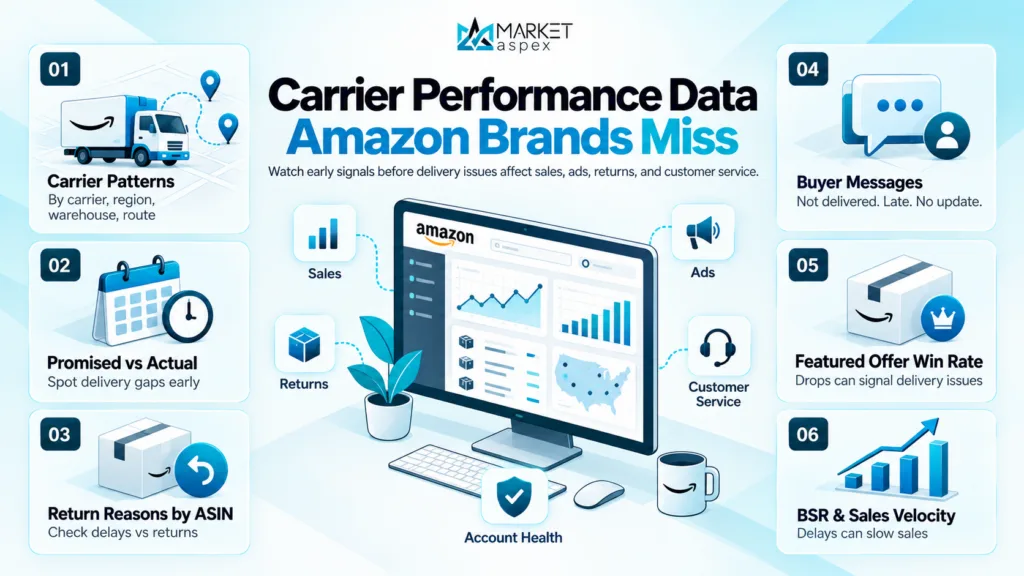
The Carrier Performance Data Most Amazon Brands Are Not Watching
Amazon sellers often check account health only after something breaks. By then, the business impact may already be moving through sales, ads, returns, and customer service.
The better approach is to watch early signals.Here are the data points that matter:
1. Carrier-Level Delivery Patterns
Look for repeat issues by carrier, region, warehouse, or shipping method. If one carrier consistently misses delivery windows, the issue may show up in customer complaints before it becomes obvious in account health.
2. Promised Delivery vs Actual Delivery
Track the gap between what the customer was promised and when the package arrived. This is one of the clearest ways to spot delivery pressure before it becomes a larger trend.
3. Return Reasons by ASIN
If returns rise on specific products during the same period as delivery delays, do not assume the product is the only problem. Late arrival, package damage, or missed customer expectations may be part of the issue.
4. Buyer Messages and Refund Requests
Customer messages often reveal problems before dashboards do. Watch for repeated phrases like “still not delivered,” “tracking not updated,” “arrived too late,” or “needed this by a certain date.”
5. Featured Offer Win Rate
Amazon’s Featured Offer, often called the Buy Box, is influenced by several factors, including price, stock, delivery speed, and order experience. If your win rate drops without a price change, fulfillment and delivery performance should be part of the review.
6. BSR and Sales Velocity
Best Sellers Rank is based on sales performance. Shipping delays do not directly change BSR by themselves, but they can reduce sales velocity if customers cancel, reorder less often, or choose a faster competing offer.
The delayed package is not always the main problem. The bigger problem is failing to connect delivery performance with revenue performance.
The Real Revenue Cost of Shipping Performance Gaps
Shipping delays can affect more than customer satisfaction. They can affect conversion rate, ad efficiency, organic performance, and long-term customer value.
Here is how the damage can compound:
- Conversion rate can soften if customers see slower delivery promises or weaker offer positioning.
- Sponsored ad spend can become less efficient if traffic lands on listings with weaker delivery confidence.
- Repeat purchase rate can drop when first-time buyers receive late orders and do not come back.
- Returns and refunds can rise when delivery misses the customer’s actual need date.
- Wholesale and distribution buyers may view poor Amazon performance as a sign of operational weakness.
- Stakeholder reporting becomes harder when revenue drops and the team cannot explain whether the issue came from ads, inventory, fulfillment, or product demand.
Harvard Business Review cites Bain & Company research showing that improving customer retention by just 5% can increase profits by 25% to 95%.
For Amazon brands, delivery consistency is one part of that retention equation. A customer may never leave a review. They may never open a support ticket. They may simply stop buying from you.
That is the quiet cost of poor fulfillment visibility.
Proactive Account Management vs Reacting to Alerts
There are two types of Amazon sellers: those who find shipping problems after Amazon sends a warning, and those who already saw the risk building.
That is the difference between checking an account and managing an account.
| Reactive Approach | Proactive Account Management |
| Learns of delays from customer complaints or Amazon warnings | Monitors carrier-level OTDR data weekly before threshold risk emerges |
| Reviews account health after metrics cross a threshold | Tracks leading indicators: promise accuracy, return rate by route, Buy Box score trends |
| Responds to Buy Box suppression after losing revenue | Identifies suppression risk and adjusts fulfilment strategy before impact |
| Treats shipping as a logistics function, separate from account strategy | Integrates shipping data into ASIN performance and ad spend decisions |
| Reports to stakeholders after a problem quarter | Delivers clean, investor-grade account performance data on a consistent cadence |
Proactive management does not prevent every delay. No seller can control every carrier issue, weather event, warehouse backlog, or Amazon network disruption.
But proactive management does help you respond faster.
It helps you know which ASINs were affected, which orders need documentation, which metrics are moving, and whether the problem is isolated or part of a wider pattern.
Hypothetical Scenario: A Q4 Carrier Delay Hits a Scaling Brand
Consider a consumer goods brand doing $2 million in annual Amazon revenue. During Q4, a regional carrier disruption delays orders across three high-volume ASINs.
Without active account management, the sequence may look like this:
- Customer messages start arriving several days after the delay begins.
- Refund requests increase, but the team does not connect them to shipping.
- Ad performance looks weaker because conversions and repeat orders soften.
- Account health is reviewed only after the metrics start moving.
- The brand reacts after revenue, customer trust, and offer performance are already under pressure.
With active account management, the same disruption is handled differently:
- Carrier and order data are reviewed early.
- Affected ASINs, regions, and fulfillment methods are separated.
- Buyer message trends are monitored for recurring issues.
- Support documentation is prepared if Amazon performance metrics move.
- Fulfillment options are reviewed for remaining orders.
- BSR, Featured Offer performance, returns, and ad efficiency are tracked together.
The managed brand has a clearer view of what happened, what it affected, and what needs to change. The unmanaged brand spends the next reporting period guessing why performance dropped.
What Sellers Should Check When Amazon Packages Are Delayed
If your Amazon orders are showing delivery issues, start with this checklist:
- Identify the fulfillment method: FBA, FBM, or Seller Fulfilled Prime.
- Review the promised delivery date and actual delivery date.
- Check whether shipment was confirmed late.
- Review tracking quality and carrier scan history.
- Pull affected orders by ASIN, region, and carrier.
- Check buyer messages for delay-related complaints.
- Review return reasons and refund patterns.
- Monitor Featured Offer performance on affected ASINs.
- Compare ad efficiency before, during, and after the delay period.
- Document carrier or fulfillment disruptions in case Amazon support needs evidence.
This turns a delayed shipment from a vague customer service issue into a measurable account performance review.
Your Amazon Data Is Telling You Something. Are You Reading It?
Carrier performance, account health, Featured Offer trends, return reasons, BSR movement, and ASIN-level sales data are not separate stories.
They are one connected picture of your Amazon channel.
A delayed package may look small on its own. But when delays repeat across products, carriers, or regions, they can expose bigger problems in fulfillment, inventory planning, customer experience, and account management.
That is where Market Aspex helps.
Market Aspex works with scaling brands to build proactive Amazon account management systems that protect revenue before problems escalate. Our team reviews the metrics that matter, connects fulfillment issues to performance data, and helps brands understand where risk is building before it becomes an account health problem.
Get a Free Amazon Account Health Review
We’ll pull your shipping performance data, account health score, and Buy Box metrics and show you exactly where the risk sits and what it’s costing you
Book Your Free Account Review